Audible.com Joins SpokenWord.org

Over the next hour we’ll be adding virtually the entire audiobook catalog (close to 40,000 titles) from Audible.com to SpokenWord.org. You can listen to free MP3 previews on SpokenWord.org and if you like what you hear, you can click through to Audible.com’s site to purchase the complete audiobook.

Why did we decide to include programs that are only available with usage restrictions or DRM (digital-resource management) from sources such as Audible.com? Two reasons: (1) We want to be a source for all spoken-word recordings; and (2) We receive affiliate-program commissions from vendors, which helps us bring you SpokenWord.org for free. We recognize that the inclusion of fee/DRM content is controversial and we’re trying to do so with full transparency.

Before launching this feature we discussed it at length internally. We also surveyed the members of The Conversations Network, 89% of whom told us they wanted us to include commercial/DRM programs so long as we made it clear what was free and what wasn’t and so long as commercial/DRM programs didn’t become a majority of the site. If you believe our presentation of these programs is in appropriate, please join our discussion. We’re always trying to improve the content and presentation.

The Levelator™ Loudness Algorithms

Over on the discussion mailinglist from AIR (The Association of Independents in Radio), we’re revisiting the recurring discussion about RMS levels in spoken-word audio files. Two days ago Gregg McVicar asked: “So what was the RMS value that you found to be the sweet spot for podcasts?”

Unfortunately, it’s a very complex answer. I’m not trying to be elusive or secretive. It really is complex. There isn’t a single value that works for even two different audio-editor applications let alone all of them. If I posted a realistic spoken-word .wav file and said, “this is standard,” and then you measured the RMS level of that track in various apps such as Pro Tools, Sound Forge, Soundtrack Pro, etc., each app would give you a different value. (Try it!)

The reason is ‘silence’. Each application has a different way of excluding segments of silence from the RMS calculation. In fact some of the most-expensive utilities don’t exclude silence at all, rendering them virtually useless for this aspect of spoken-word processing. (Is one recording half as loud as another because the speaker in the first one pauses twice as long between words?)

So the answer to Gregg’s question is that The Levelator adjusts speech to -18.0dB RMS, but that isn’t a value you can plug into any other program. If you are looking for an answer relative to your audio-processor of choice, the best way is to run a real-world program through The Levelator then measure the resulting RMS level using your software. The level your application reports as the RMS level is *your* answer to what we’ve found to be the sweetspot for podcast RMS levels.

Personally, I love the discussion of RMS levels, particularly because it’s so full of prejudices and misinformation. But I’m sure it’s not as interesting to many other people. It’s a problem I’ve worked on personally for some time, and I continue to geek out on it. If you share my passion on the topic, or if you want to know more about how The Levelator deals with RMS levels, you may enjoy a page I just posted entitled The Levelator™ Loudness Algorithms.  I would have posted this earlier, but I wanted to first run it by Bruce Sharpe, our resident math professor and designer of The Levelator’s algorithms. I’m just the concept guy on this one. 🙂

Bad RSS

The greatest challenge in keeping SpokenWord.org running on a daily basis is dealing with rogue RSS feeds. We’ve got a bit over 3,000 feeds at the moment, most of which are being scanned every hour. But I just checked the admin report, and 27 feeds (nearly 1%) have been disabled for one reason or another.

For those of you in control of your feeds, here are some of the problems we encounter on a regular basis.

  • HTTP 404 errors. If your server isn’t accessible, we can’t read your feed.
  • Invalid characters. One bad character in your feed keeps our parser from reading the whole thing.
  • Missing GUIDs. Globally Unique IDs (GUIDs) are very important.
  • Duplicate GUIDs. (They’re supposed to be Unique!)
  • Incorrect MIME types. Should be:
    • application/rss+xml
    • application/atom+xml
    • application/xml
  • The following are common, but they’re wrong:
    • text/xml
    • text/plain
    • text/html

The GUID issues deserve more discussion. When you rescan feeds every hour, one of bigest challenges is to figure out if an <item> is old, new or modified. Here’s our logic:

  • If we’ve never seen this GUID before, we assume it’s a new <item>.
  • If we’ve already ingested an <item> with this GUID, we check all the pertinent elements and attributes for changes.

The GUID allows you to make changes like correcting a spelling error in a title. We see the unchanged GUID, notice that the title has changed, and just replace the title. Without the GUID, we have a helluva time trying to figure out whether an <item> with a one-character change in its title is just that or a whole-new program. We want you to be able to correct your titles, descriptions and media URLs without our system creating a duplicate program. Only your proper use of GUIDs makes that possible.

Once you assign a GUID to a program, never change it. That means never. And make sure your GUIDS are truly globally unique. Using a unique URL from your site as a GUID is a good way to do this. No other site is likely to include http://yourdomain in their GUIDs. And never, never, never reuse a GUID for another program. You’d be amazed at the number of feeds that include the same GUID for more than one <item>. I’ve designed our system to immediately disable any feed in which a duplicate GUID is detected.

As a somewhat defensive move, but also to help those who submit RSS/Atom feeds to SpokenWord.org, I’ve added code that runs submitted feeds through the W3C RSS Validator. We’ll accept Warnings, but if your feed generates Errors from the validator, we will reject it. My next step is to likewise call the W3C validator when we encounter a problem and to after-the-fact disable feeds that don’t validate.
Using Kampyle.com

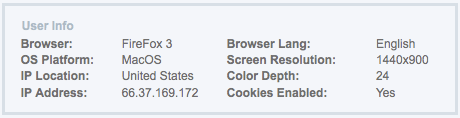
A few weeks ago we started using an online service, Kampyle.com, for all The Conversations Network’s web sites including SpokenWord.org. Kampyle.com is one of those services like Google Analytics and ShareThis.com: They do one relatively small thing and they do it very well. In the case of Kampyle.com, it’s website or application-software feedback. On SpokenWord.org, for example, you’ll notice the yellow triangle that always floats in the lower-right corner of your browser. Click it, and you get a convenient form for sending us feedback, reporting a bug, etc. From the user’s perspective, it couldn’t be much easier. But the real magic is on our side. For example, here’s just some of the metadata we get from Kampyle.com when you report a problem:

For debugging a web site, this is invaluable. It typically saves us at least one complete email exchange with someone reporting a problem. No longer do we have to ask, “What OS and browser are you using?” Given that we’re still at the stage where we have a fair number of JavaScript and CSS problems, this alone has made deploying Kampyle.com worthwhile. In fact, I was initialy concerned that adding a floating widget to our pages would itself create CSS nightmares, but my fears have proven unfounded. We’re not getting ay complaints about it. And ever since we added the Kampyle.com widget, our website feedback has increased about 400%. I only wish we’d had it avaialble during our alpha-test. Very cool.

Podiobooks

We just added the entire audiobook catalog from Podiobooks.com to SpokenWord.org. That picked up 6,087 chapters from 284 books, with more being added every day. You’ll find one of the most-recent Podiobooks on our home page or you can browse the entire collection. Special thanks to Ray, Evo, Chris and Tee for creating a great site and for making it so easy to pull in their catalog.

Preliminary Survey Results

We’ve only been running our annual survey for a few days, but we’ve already had 389 responses. Some early highlights:

  • 47% use iTunes on OS X or Windows.
  • 63% subscribe to one or more of our RSS feeds.
  • 89% are male.
  • 41% have a Master’s degree or higher. (This has been consistent year after year and still surprises me.)
  • 55% are in the U.S.
  • 38% didn’t realize The Conversations Network was a 501(c)(3) nonprofit.