Fair Use?

This is a fascinating case, particularly for me both as a photographer and a fair-use advocate. You should probably read the story for yourself, but I’ll summarize it here. Andy Baio is well-known and respected in the tech world. He produced an album (Kind of Bloop) based on the songs from Miles Davis’ classic album, Kind of Blue. He got all the permissions and rights he needed to the music, but when it came to the album art, he created a somewhat pixelated version of the original image without getting any permission. It turns out the orignal album-art photo was taken by and belongs to a great photographer, Jay Maisel. Jay sued Andy and they settled out-of-court for $32,500. Andy still feels he was right based on the concept of “fair use.” Here are the two versions: Jay’s original and Andy’s interpretation.

kind_of_bloop_comparison-20100701-172352

What do you think? Should Andy have been able to sell his album using the cover on the right without first getting permission from Jay? Would you say that Andy’s version qualifies as “fair use” of the original? It’s a tough call for me.

First, you should know that I’m a supporter of and contributor to the Electronic Frontier Foundation (EFF), who played a role in this case, so I’m a strong believer in the fair-use concept. I believe our copyright laws are severely inhibiting creativity and are increasingly just serving a copyright consortium rather than serving the public good, as originally intended. I have some experience in copyright, trademark and other intellectual-property law, but I am not an attorney. I’m a layperson who has taken an interest in this area for decades. Most notably, I am not up-do-date on the latest details of the fair-use doctrine. In other words, I’m not qualified to give a legal opinion about who is right or wrong in this case — only an emotional one.

Given that disclaimer, I do have an opinion, event though it’s not based in law. To me, I think Andy’s image is a derivative work that goes beyond what I consider to be fair use. From a purely practical point, I can’t figure out why Andy didn’t try to get permission to use Jay’s image in the same way as he did for the music? Did he think it was somehow more incidental? If you’re a photographer, your images are as important to you as a song might be to its composer. This is an iconic album cover, which on one hand suggests that it’s fair game for fair use, but it’s also a work of art and deserves the same protections as any other.

Ultimately, Andy asks an important question at the end of his blog post (scroll to the bottom of the page) where he writes, “Extra credit: Where would you draw the line?” Is there some point in abstracting the image at which the original image is obscured to the point at which the derivative work is no longer infringing of Jay’s copyright? Is this even a legitimate way to evaluate the issue? A fascinating debate in any case. What do you think?

Update: I should have mentioned that I first heard about this from Thomas Hawk, for whom I also have great respect. In this case, however, I disagree with him. But check out Thomas’ blog post and the comments.

Salvaging the Shoot

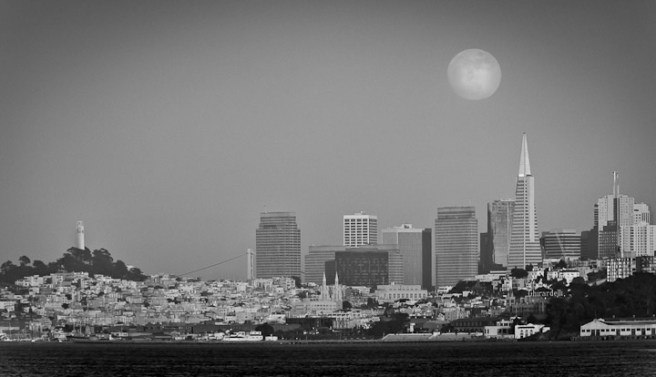
Once again, I’m determined to get the shot. In this case, it’s the full moon rising behind downtown San Francisco. Last night was my first attempt, but given the horrible results, it won’t be my last. I was about to delete all the images from the session, but first I decided to play with them to see how much I could extract before giving up.

Like all serious shoots, it began with research.

  • The experts told me the best time to shoot is when the moonrise is 30 minutes before sunset. That’s often the night before full moon on the calendar. In this case (June 14, 2011) moonrise was at 7:48pm and sunset was8:33pm. Not a bad spread.
  • To find the best position I used The Photographer’s Ephemeris, an awesome iOS app that shows you the exact position of the sun and moon on any date at any time.
The Photographer's Ephemeris

Everything was ready, save for the one big fear: the fog, which everyone knows can come barreling in through the Golden Gate during the summer. But fog didn’t turn out to be the problem. Due to a moderate high-pressure system just offshore, there was no marine layer and no wind. And that meant haze and smog: a fairly heavy layer up to about 1,000 feet. Yuck.

But having gone this far, I schlepped all the gear (including a second body+tripod for a timelapse) to the location where I found three other photographers, all with Nikon gear. Two of them had pinpointed the location using The Photographer’s Ephemeris as well. It was so hazy, we couldn’t even see the moon until it was well above the skyline, so the photo below is one of the first of the evening. And one of the best. This was shot about 25 minutes before sunset.

Original from the Camera

As you can see, it’s horribly flat and dull. After some tweaking in Lightroom, I was able to recover some of the contrast and clarity:

700_9034
With Global Lightroom Tweaks and Crop

Yes, I could have further lightened the unnaturally dark and saturated water and made a number of other improvements, but I just didn’t want to waste a lot of time on this one.

I posted the tweaked image on Facebook, where photo pal Scott Loftesness suggested I see how it looked as a black-and-white. I popped it into Silver Efex Pro 2, where I spent some time making a number of global and local adjustments and ended up with this:

700_9034-Edit-Edit
Further Tweaked in Nik Silver Efex Pro 2

What do you think? It’s still not at all the shot I’m looking for, but compared to the original, I think it’s at least a serviceable image. If nothing else, it shows that if you keep working at it and consider all the options (b&w in this case) you can sometimes salvage a shot that would otherwise end up in the trash.

Update: I went back and tweaked the moon. First I changed the mapping from RGB into b&w, then I adjusted the contrast. Finally, I used a layer mask in Photoshop to merge the enhanced moon into the original image. It gives the picture an entirely different look, doesn’t it?

700_9034-Edit-Moon-720w

Happy Birthday, The Conversations Network

Yesterday was the 8th anniversary of IT Conversations, the longest running podcast in existence and the flagship channel of The Conversations Network. Since its founding, The Conversations Network has published 2,918 audio programs for an average of one every day for these past eight years.

Thanks to our members,major supporters and TeamITC, the wonderful folks you never hear about that bring you those new programs every day.

I’m a TWiP Again

Once again I had the privilege of being a guest host on the This Week in Photo podcast (#202), sharing the show with Frederick Van Johnson, Syl Arena and Ron Brinkmann, three of my personal photo heros.

On this episode of TWiP, in case of a water landing – take pictures, Getty Images acquires PicScout, Adobe gets touchy feely, and an interview with SnapKnot.com co-founder Reid Warner.

My first appearance was on episode #153, nearly a year ago.

Photography Workshops

Like any other photographer, I’m always looking for ways to improve my skills. There are a lot of options out there: books, magazines, community college classes, online videos (free and $$$) and local photography clubs. And then there are the photo workshops — they’re everywhere. I’ve attended two workshops in the past few months, and while that certainly doesn’t make me an expert, I do now feel like I know what to look for in the next one. (I’m not including the San Francisco stop of the FlashBus 2011 Tour, which was fun, but more of an event than a workshop.)

Artist's Road, Santa Fe, at Sunrise

In March I attended a workshop led by Derrick Story. A good friend, Scott Loftesness, had been to one of Derrick’s earlier workshops and enjoyed it. Since I was able to talk Scott into trying another one with me, and because Derrick’s classroom and studio are in Santa Rosa, California (just an hour from home), it was a low-risk investment. The two-day workshop included eight students and cost $495. Derrick provides lunch both days, but you’ve got to get yourself to Santa Rosa and pay for a hotel room unless you’re local.

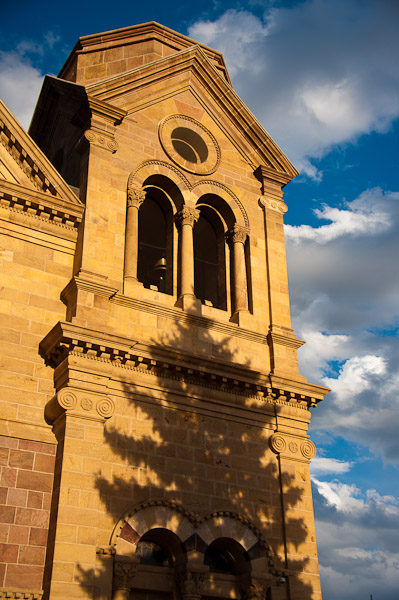
Santa Fe Cathedral at Sunset

Two weeks ago I went to a very different kind of workshop: the Mentor Series Photo Trek in Santa Fe, New Mexico. This three-day program had 37 students, two instructors, a bus and driver for the first two days and cost $1,000, which included no food, housing or transportation to/from the event. Mentor Series is owned by Popular Photography and runs about a half-dozen  workshops each year all over the world.

So how did they compare? In the case of the Mentor Series Trek, it’s “trek” that’s the operative word. It’s more about the location and somewhat less about photography. Yes, the attendees are all photographers (some with some very fancy gear) but you spend virtually all your time on the go. The first two days we were on the bus getting from one scenic location to the next a few hours each day, and once we arrived, there were often miles of walking to do. Beautiful scenery to be sure, but more hiking than shooting. And certainly not a lot of time to stop and “work” a subject for an extended period. The best shooting was actually the day they dumped the bus and we walked the city of Santa Fe on foot: once at sunrise and once at sunset. [Santa Fe is one of the best cities I’ve ever shot in. You could easily spend two or three days just walking its streets with a camera. Great art and architecture, terrific light and shadows, and a community that is very accepting of (and used to) photographers wandering around.]

By comparison, Derrick Story’s workshops often include a location such as a local safari park or (as next month) an early morning balloon launch, but there’s usually just one outside event per weekend. The rest of the time is spent in his studio — he usually includes at least one model session — and in the classroom. And it’s the classroom (and the class size) that really sets the two experiences apart. Derrick spends some of his time actually teaching from a podium and he gives the students actual assignments. For example, he might send you into the studio to shoot a model using only a single strobe. That’s something you can do when there are only eight students and they break into groups of four. With 37 students — forget it; everyone is on their own.

This brings up the question of why take one of these workshops at all. Professional photographers on assignment are obviously going to shoot a lot. But we serious amateurs have an interesting challenge. When my wife and I recently went to Egypt, I would have loved to have been able to stop and spend an hour or two studying the light and playing with the composition at each location. I would have given up half or more of the less-visually interesting sites in order to have more time at a few of the good ones. But that’s just me. My wife doesn’t particularly enjoy standing around while I study and experiment, and certainly the 22 other non-photographers in our tour group wouldn’t stand for it.

In one sense this is the role that weekend or weeklong workshops play. They allow the serious amateur to immerse him/herself in photography, surrounded by other photographers in a context where their peculiar habits of stopping, studying and shooting are socially acceptable. I imagine this is why Trekkies go to conventions. Wearing Mr. Spock ears to the grocery store is going to earn you some very strange looks. At a workshop you can truly geek out. Even when you’re on a bus, it’s all photography. All the time.

And what about the other students? Looking back, it’s not too surprising that a group of 37 would include a wider range than one of only eight. But I was surprised that the Mentor Series Trek included same true novices, some with the most expensive DSLRs. There were times when the instructors had to explain the relationship of aperture to shutter speed and ISO, and that surprised me. The instructors were even cornered by students with questions like, “What is ISO and how do I set it on my camera?” or “How do I focus this camera?” (Perhaps not surprisingly, some of these technically naive students sometimes produced some of the compositionally most exciting pictures.) In the smaller group of Derrick Story’s workshop, the range of skills was somewhat narrower although it still varied more than you might expect. Derrick does a good job of giving assignments that are applicable to each student’s skills.

In Santa Fe, I had relatively little access to the instructors given the 1:18.5 ratio as opposed to 1:8 at Derrick Story’s workshop. But even in Santa Fe, they were there if you had an important question. Towards the end of the Mentor Series weekend each student had the chance to show each of the instructors five images for critique (ten images total), and those sessions were quite valuable. We each got four or five minutes of constructive criticism that was appropriate for our skills.

Another benefit of any workshop or joining a photo club is the chance to see how other photographers interpret the same objects and locations. This happens in both the small and large workshops. No matter your level of experience, there are always those moments of, “Wow, I missed that!” that are truly educational.

So which of these two (or any other) do I recommend? It depends on what you want, of course. If pure learning is your goal, then I’d recommend a workshop with the smallest number of students, even a day of one-on-one. And I wouldn’t worry about finding the absolutely best photographer. So long as it’s someone whose work you respect and has been shooting it for a lot longer than you, you’re going to learn. Of course, reviews and opinions of previous students will help a lot.

On the other hand, if it’s a destination you particularly want to shoot or if you particularly want to travel, a larger more-distant workshop might be better for you. Mentor Series, for example, runs treks to places like Switzerland, London, Hawaii, Sedona and Wyoming. If you’re drawn to one of those locations and you want to experience the places in the context of photography, these might be better choices for you.

As for me? My prejudices probably show through in this blog post. I’m signed up for Derrick Story’s Hot Air Balloon Photo Workshop in a few weeks. None of the Mentor Series treks are on my calendar. I’m going to continue looking for small-group workshops that I can get to without hopping on an airplane. I’m also going to spend as much time as possible taking photo walks with friends. For example, tomorrow Scott and I will be shooting at the San Mateo Maker Faire as we did together last year. It’s tremendously visual and there’s enough to keep you engaged for a full day or more.

The Amazon Web Services (AWS) Outage

Like many other sites hosted on AWS, all of The Conversations Network’s websites went down at 1:41am PDT on April 22, 2011. It would be 64.5 hours until our sites and other servers would be fully restored. A lot has been written about this outage, and I’m sure there’s more to come. Don MacAskill, another early adopter of AWS, has posted a good explanation of SmugMug’s experiences during the outage.  Phil Windley and I are hoping to interview our friend Jeff Barr from AWS for Phil’s Technometria podcast once the dust has settled at Amazon.

Many pundits have suggested this event highlights a fundamental flaw in the concept of cloud computing. Others have forecast doom and gloom for AWS in particular. I disagree with both arguments. While it certainly was the most significant failure of cloud computing to date, I predict this event will become not much more than a course correction and a “teachable moment” for Amazon, their competitors, all cloud architects and of course us here at The Conversations Network. For the geeks in the audience, I’m going to describe our architecture, the AWS services we utilize, and give a bit of an explanation about what happened and what we learned.

The Conversations Network utilizes three basic AWS services, plus a few more that aren’t really pertinent to this episode. Our servers are actually instances of AWS Elastic Compute Cloud (EC2) servers. The root filesystem for each server is stored in a small (15GB) AWS Elastic Block Storage (EBS) volume. Not only are these volumes faster than local storage, they’re also persistent. So if/when an EC2 instance stops, the root filesystem for that instance remains intact and will continue to be usable if the instance is re-started. [EC2 instances are booted from Amazon Machine Images (AMIs). In our case, these are based on Fedora 8 (Linux) customized to our standards. The AMIs are identical for all our servers, but the EBS root filesystems, which change dynamically once a server is booted, are unique to each server.]

We also use EBS volumes for non-relational storage. For example, we have one large EBS volume for IT Conversations and other podcast filesystems. This holds all the audio files and images used on the website. We have another for SpokenWord.org, and so on. These EBS volumes are each mounted to one EC2 instance, which in turn shares them with the other servers via NFS. Finally, we use the Relational Database Service (RDS) for our MySQL databases. Like EBS, this is a true service as opposed to a “box” or physical server.

One very important feature of EBS is that you can take snapshots at any time. For example, we make a snapshot each night of each EBS volume. We keep all snapshots of all volumes (other than the EC2 root filesystems) for the past seven days, plus the weekly snapshots for the past four weeks and the monthly snapshots for the past year. The cost of keeping a snapshot is based only upon the incremental differences since the previous snapshot, so it’s quite a reasonable backup strategy even for large volumes so long as they don’t have changes that are both major and frequent.

Designing any server architecture, cloud-based or otherwise, requires that you consider the failure modes. What can fail? What will you lose when that happens? How will you recover? Automatically or manually? How long will recovery take for each failure mode? It’s not about eliminating failures — you can’t really do that. Rather, it’s about planning to deal with them. And like traditional architectures, the cost of the configuration increases geometrically as you increase the reliability (ie, decrease the amount of time it will take to recover from a failure).

We’ve been using AWS for more than four years. During the period when IT Conversations was part of GigaVox Media, we were the basis of one of the first case studies published by Amazon. [Here’s a diagram of one of our AWS-based configurations.] Because The Conversations Network (a non-profit) runs on a shoestring budget and can’t afford the level of redundancy deployed by some commercial enterprises (eg, SmugMug), we’re not looking for a particularly high-reliability architecture. Until last week, we’ve have EC2 instances that haven’t stopped in well over a year. We can’t tolerate any significant loss of data so we need the redundant storage of EBS, but a 99.9% uptime is good enough for us, and that’s what we’ve had from AWS until now. Because of our experience with the high-reliability of AWS, we have never gotten around to automating the re-launching of EC2 instances in case of failure. We do use two separate monitoring services, and there are two of us (me and Senior Sysadmin Tim) who are capable of restarting servers, etc., if something does go wrong.

AWS operates in five regions around the world. We happened to pick US East in Virginia instead of US West (northern California) for no particular reason. Within each region there are multiple physical locations called availability zones. These are probably separate data centers within a metropolitan area. The availability zones within a region are connected by very high-speed fiber. This means you can have some degree of geographic redundancy by deploying servers in multiple availability zones, or achieve even greater protection by also deploying duplicate systems in multiple regions. The latter is far more complex, since the connectivity between regions is not as good as between availability zones. Our needs are humble, so all of The Conversations Network EC2 instances, EBS volumes and RDS databases are located in the us-east-1a availability zone. And of course, that’s where last week’s failures occurred.

Amazon hasn’t yet said what the original failure was. All of our EC2 instances were running and they could communicate with the RDS databases. I think the problem might have been the association between the EC2 instances and the EBS volumes. The volumes used as root filesystems were reachable, but not the others that contained our site-specific files.

After a few hours of downtime, I decided to re-boot our EC2 instances and that’s when things went from bad to worse. All of our EC2 instances entered the Twilight Zone. They were stuck in the “stopping” state. The operating system halted (no SSH access) but the servers didn’t release their EBS volumes. I could have launched all-new EC2 instances, but I wouldn’t be able to connect them to the volumes and hence, no websites.

Because of our backup strategy, however, we did have one more option: We had snapshots of our EBS volumes. I could have created all-new EBS volumes from the daily snapshots, and I could have done so in a different availability zone to get away from the problems. But there was one gotcha. We make the backup snapshots at 2am Pacific time each night. The failure occurred 19 minutes before that, which means our snapshots lacked the most-recent 24 hours of activity: new programs, audio and image files, logs, etc. As with the few previous problems we’ve had with AWS (mostly of our own causing) we thought this outage would be fixed quickly. It was a tradeoff: It seemed better to wait an hour or two rather than to re-launch with day-old data.

Of course “an hour or two” dragged on. Soon the outage was 24 hours old; then 48. It always seemed that the fix was imminent, so we delayed the restart process. Eventually, we decided to go ahead, and that’s when we discovered our one real mistake. Remember that we make snapshots of our EBS volumes every night? Well it turned out that we weren’t making those snapshots of all of our volumes. There was one volume that we somehow missed. The only snapshot we had of that volume was from the date it was created, more than a year ago. That means we would have had to launch our sites with some very old data. In this case, when we finally got access to the most-recent data (on the in-limbo EBS volumes) it would be difficult to reconcile it all. In the end, we decided just to wait it out. Finally, after 64.5 hours, the one EC2 instance that was holding hostage our last EBS volume stopped. We were then able to re-attach that volume to a newly-launched instance. We brought up all-new EC2 instances, attached all the then-current volumes and we were up and running, still in availability zone us-east-1a.

So what did we learn from all this? We re-learned that you have to think through these architectures carefully and understand the failure modes. But most importantly, we learned that once you have a good plan, you have to follow through with it. If we had been making nightly snapshots of that one remaining EBS volume all along, we would have been able to re-start the websites with day-old data at any time, regardless of the problems AWS was having disconnecting EBS volumes from running EC2 instances.

I also have a new strategy for deciding when to stop waiting for AWS to recover and instead switch to the snapshots: Once the length of the outage exceeds the age of the backups, it makes more sense to switch to the backups. If the backups are six hours old, then after six hours of downtime, it makes sense to restart from backups. In this case, we should have done that after the first 24 hours.

But we still know we don’t have ultimate redundancy: We still have to re-start things manually. So long as we accept the downtime, we can survive the total failure of the us-east-1a availability zone and even the entire US East region. That’s because all EBS volumes are first replicated to multiple availability zones within the region, and our nightly snapshots are stores in Amazon’s Simple Storage Service (S3), which is replicated across multiple regions. So our current data can survive a failure within a region and our day-old data can survive a failure of our entire region.

We still have a few things to cleanup and repair from this experience, but all-in-all we remain fairly happy with how things turned out. We didn’t, after all, lose any data. And while we aren’t proud that our sites were down for nearly three days, the world as we knew it did not come to an end. Maybe our team is even glad to have a few days off. (Too bad we couldn’t have told them in advance.) We still have one EC2 instance that refuses to stop, but it’s one of those that used NFS to reach EBS volumes attached to another server. Amazon says “We’re working on it.” Other than that, we’re now better prepared for the next failure, so long as its just like this one. Actually, I think we’re in pretty good shape for most events I can foresee. AWS. It continues to be a great platform for us.

Confessions of a Facebook Slut

There’s one problem with being a Facebook Slut (accepting nearly every friend request) and having 700+ so-called friends. I’m now entirely dependent on the filtering in FB’s ‘Top News’ stream. It’s smart enough to know whom I really care about and filters out the rest. The other ‘Most Recent’ stream is unfiltered, so I have to scroll through pages of stuff people who aren’t really friends and family in order to read stuff from those who are. Okay…that works on the website, but as far as I can tell, the FB apps for iPhone, iPad and (my favorite) Flipboard don’t have access to the filtered ‘Top News’ feed. Apparently they can only deliver the unfiltered ‘Most Recent’ feed, which renders them pretty much useless for a slut like me. Unless one of my 700+ friends has a fix.

PocketWizards for Nikon

I’ve been using Nikon’s light-based CLS system for triggering my SB-600 and SB-900 strobes, but as others have experienced, I’ve been running into the line-of-sight limitations of that system. Last week I bought a set of Nikon-specific PocketWizard radio triggers. Learning how they work took a little longer than I expected, but the preliminary results are good. The supplied instructions are rather terse, so perhaps the following will save you some time if you go this route. In addition, you’ll want to refer to the wiki-based online documentation. (The Nikon-specific information is in an appendix.) There are all sorts of peculiarities such as how the PW system interacts with Nikons VR lenses.

The Nikon-specific PocketWizards are primarily designed to work with Nikon’s excellent TTL-based exposure system, iTTL, although they will also trigger older PW receivers. The basic setup is to pop a PocketWizard MiniTT1 transmitter on the camera’s hot shoe and a FlexTT5 transceiver under each Nikon strobe. You then set the strobes to TTL mode, make sure all PW devices are on the same configuration (C1/C2) and you’re set. All strobes will fire in sync and the Nikon CLS will do its thing to compute the exposure. I found:

  • Flash exposure compensation works as usual.
  • High-speed sync (FP) works well to 1/8000 sec, and you don’t have to do anything special to enable it. It just works all the time.
  • Even the modeling light works when you press the camera’s depth-of-field preview button.
  • Don’t put your strobe into Remote mode. Just set them up as though they were connected to your camera’s hot shoe.
  • In this basic configuration, the selection of groups (A/B/C) on the FlexTT5 makes no difference.
  • Automatic strobe zooming does not work, which makes sense whenever the strobes are not in the camera’s hot shoe. You must zoom your strobes manually.

Nikon’s Commander Mode, the ability to adjust the power of remote strobes individually (Nikon menu: Flash Control for Built In Flash) doesn’t work with PocketWizards. Instead, you need to buy a third device: the AC3 Zone Controller. This gadget sits on top of the MiniTT1, which is already atop your camera. The AC3 lets you dial-in power adjustments in 0ne-third stop increments for strobes in three groups (A/B/C). Note that these have nothing to do with Nikon’s A/B/C groups. It took me a while to comprehend this. The remote strobes think they’re each connected directly to the camera’s hot shoe. When used with PWs, the strobes know nothing about Commander Mode. They’re not “remotes” in that sense.

The AC3 really is a must-have unless you’re only shooting manually.  In addition to adjusting the power for each group relative to what Nikon’s CLS/iTTL would otherwise direct, you can switch a group into Manual mode to override the CLS control. The AC3’s +/- control wheel for each channel is mapped into controlling the flash output from 1/64 to full power. Note that so long as you want to use the AC3 for exposure control, leave your strobes set to TTL mode, even if you select Manual (M) on the AC3.

I occasionally use a Sekonic L-358 flash meter, so I decided to buy the optional Sekonic RT-32N module that fits inside the meter and allows one to trigger the strobes from the meter via PW radio signals. It took me quite a while to figure out how to configure everything for this mode of operation. It required changing the internally stored configurations of the PocketWizard devices, which in turn requires that you connect them to a computer via a USB cable, then use the PocketWizard Utility, which you can download from the company’s website. It runs on OS X or Windows and is very simple to use. You can save configurations in files, which makes updating a set of devices a simple matter.

I ended up using the two configuration settings (C1/C2) for TTL and “metered” mode, respectively. Here are the configuration values I’ve used successfully:

Config 1: AC3 for TTL or Manual Exposure Control

  • Strobe: TTL/FP Mode
  • FlexTT5: Normal Trigger Mode, Channel 7
  • Mini TT1: Normal Trigger Mode, Channel 7

Config 2: Sekonic-Meter Triggering and Manual Exposure Control

  • Strobe: Manual (M) Mode
  • FlexTT5: Basic Trigger Mode, Channel 27
  • MiniTT1: C2: Basic Trigger Mode, Channel 27
  • Sekonic: Channel 27, Group A (or other groups as needed)

With the above configuration, you can simply switch all the devices from C1 (for TTL) to C2 (for manual metering). In the manual-metering mode, you no longer have the ability to control strobe output using the AC3. Instead, you have to go to each device and set its power output manually. This is because the trigger signal is being transmitted directly from the Sekonic meter to the FlexTT5 transceivers. The camera, MiniTT1 and AC3 aren’t involved. Of course, you can still press the camera’s shutter release to trigger the strobes, which is why you need to set both the MiniTT1 (on the camera) and the Sekonic meter to the same channel as the FlexTT5 transceivers.

It all makes sense once you work your way through it. Or you can just copy my configurations as a shortcut. You might want to use channels other than 7 and 27 if you’re going to be shooting near me!

After just a few days, I’ve grown to like the PW system, as have most others who’ve tried it. On one hand there are more gadgets, batteries and things to go wrong. On the other hand, they don’t seem nearly as finicky as using Nikon’s optically based system. I can just set and aim my strobes where I wan’t. I don’t need to worry about whether they can read the signals from the camera. Now to see if I can get past the gadgets and make some good pictures with them.

Tracking the Cost of Disk Storage (Feeling Old?)

Cory at BoingBoing blogged David Isenberg’s tracking of the historical cost of rotating magnetic disk storage.

YEAR — Price of a Gigabyte
1981 — $300,000
1987 — $50,000
1990 — $10,000
1994 — $1000
1997 — $100
2000 — $10
2004 — $1
2010 — $0.10

I can remember buying an IBM 5022 disk subsystem in the mid 1970s composed of two 2.5MB platters (one fixed, one 5440 removable cartridge). According to the 1971 IBM press release (http://www-03.ibm.com/ibm/history/exhibits/system7/system7_press.html) the purchase price was $16,225, which comes to $3,245,000 per gigabyte in 1971 dollars or $16,999,437.09/GB in 2009.

Book Review: Within the Frame, by David duChemin

As an aspiring photographer, I’ve followed the blog and work of David duChemin for some time now. Mostly, I’ve appreciated his terrific photos. But last week I just happened to win a copy of his 2009 book, Within the Frame, at the local photo club’s annual banquet raffle. I’m only 40 pages into it, but already I know I’ve stumbled upon a real gem. David isn’t just a veteran photographer, he’s also a terrific writer. (Who knew?)

The book’s subtitle is “The Journey of Photographic Vision.” As David explains, photographers are (perhaps uniquely) part Geek and part Artist. If you’re like me — the Geek part comes more naturally — this is a great book for you. There’s virtually nothing here about the technology of photography or the gear. It’s all about that vision thing. In the first quarter of the book (which I’m still reading), David explains his emotional connection to the photographic process. The remaining chapters focus on storytelling and specifically photographing People, Places and Culture. If you’re trying to improve how you translate what you see and feel into a finished photograph, David’s narrative will give you a lot to think about regarding how you approach the art of photography.